
IRS Payment Plans
How to Set Up an IRS Payment Plan Online in 2026 (Step by Step)
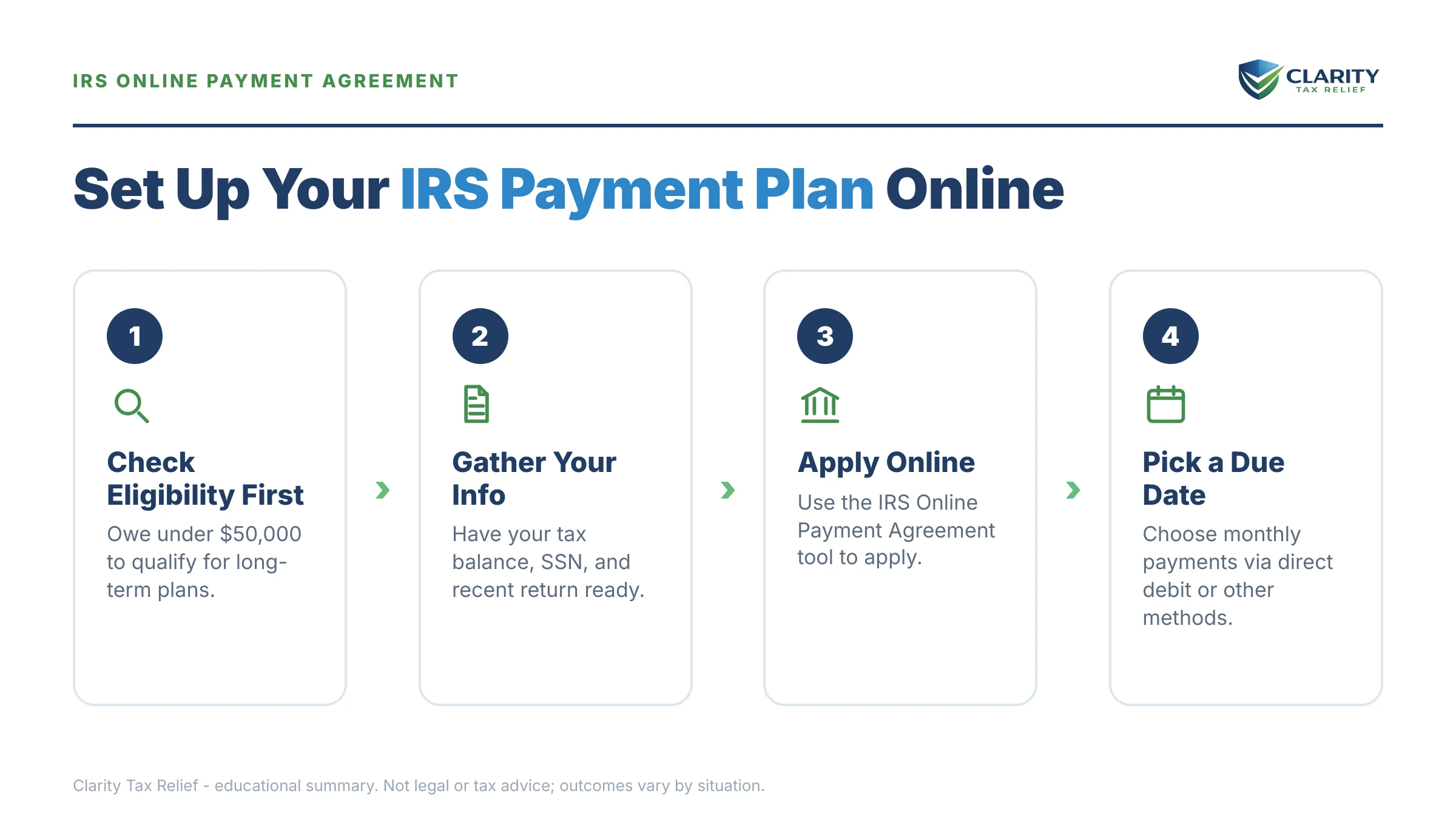
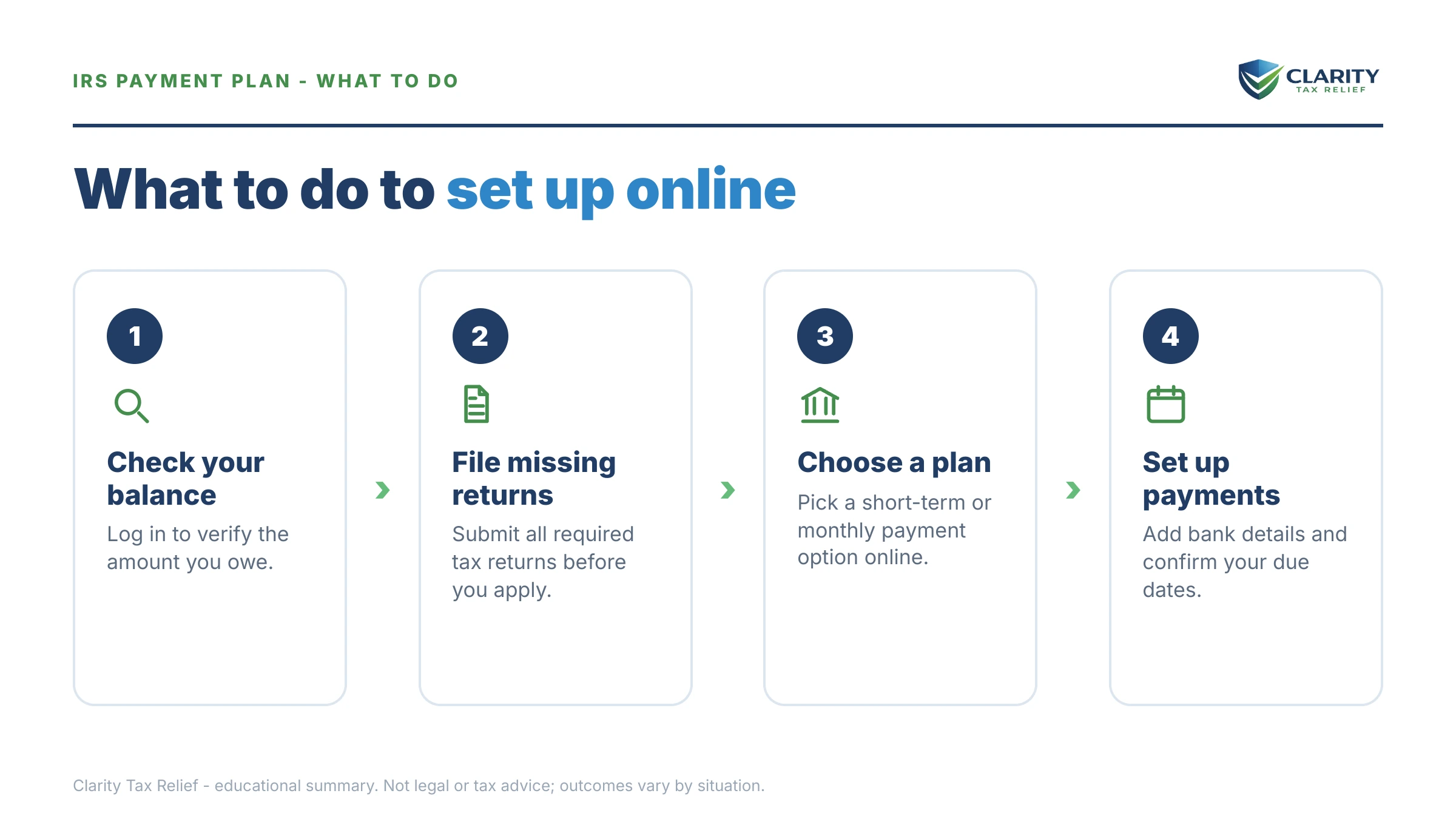
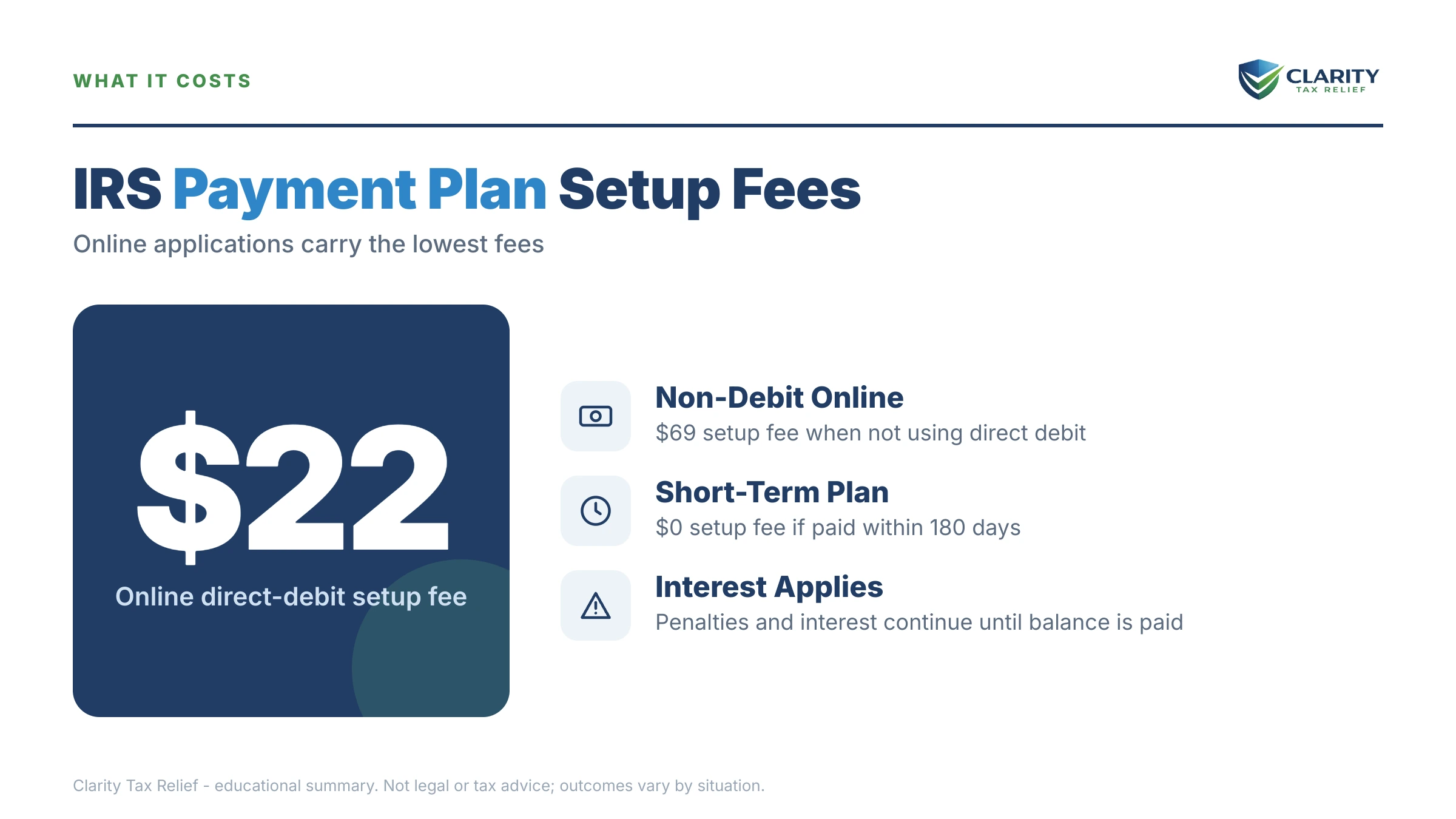
The short answer: you set up an IRS payment plan online through the IRS Online Payment Agreement tool: sign in with your IRS online account, choose a short-term plan (up to 180 days, $0 setup fee) or a monthly installment agreement (up to 72 months on balances of $50,000 or less), and get an answer on screen, usually immediately.
You filed the return, the software showed a balance bigger than your checking account, and now you're wondering how to set up an IRS payment plan online before the notices start. If you're self-employed, this is usually the year the quarterlies got away from you — the tax bill arrived all at once instead of in four pieces. The fix is faster than most people expect: for most balances under $50,000, you can have a binding agreement with the IRS in place tonight without speaking to a single person.
That matters more in 2026 than ever. The IRS cut roughly 27% of its workforce in 2025, so the phone lines are brutal, but the Online Payment Agreement tool runs 24/7, and the automated collection system that sends levy notices never stopped either. The application takes about 15 minutes once you're signed in; the image below shows exactly what the online tool looks like and where the choices that actually matter appear.
⏱ The real clock: there is no application deadline for a payment plan, but the failure-to-pay penalty adds 0.5% of your balance every month, and interest compounds daily, until an agreement (or full payment) is in place. Once a plan is approved, that penalty rate drops to 0.25% per month. Every month you wait is money you're volunteering.
Who qualifies to set up an IRS payment plan online in 2026
Individuals who owe $50,000 or less in combined tax, penalties, and interest, with every required return filed, can set up a long-term IRS payment plan entirely online. Short-term plans online generally cover combined balances up to $100,000, as long as you can pay everything within 180 days.
Two things disqualify you from the online tool no matter how small the balance: an unfiled return the IRS is expecting. A recent defaulted agreement on your account. The tool checks IRS records in real time and rejects automatically. It doesn't negotiate, and it doesn't explain much. (We cover both fixes below.)
Three thresholds decide which plan family you land in, and they're worth knowing before you log in: $10,000 (below it, acceptance of a guaranteed installment agreement is required by law, but only for individuals with an income-tax balance of $10,000 or less excluding penalties and interest, all required returns filed, timely filing and payment for the past 5 years with no installment agreement in that period, and full payment within 3 years), $25,000 (above it, direct debit becomes mandatory for a streamlined plan), and $50,000 (above it, the online long-term option disappears and financial disclosure enters the picture). The rules shift slightly year to year — see IRS payment plan changes 2026 for what moved this cycle.
“Note: Once you complete your online application you will receive immediate notification of whether your payment plan has been approved.”
— Online payment agreement application (IRS.gov)
What happens if you don't set up a payment plan
Without a payment plan, the IRS moves your balance through an automated notice sequence that ends in wage and bank levies. No human decides to escalate you — the system does it on schedule:
- CP14 — the first bill. You typically have about 21 days from the notice date before the sequence advances. Setting up a plan here is the cheapest outcome available.
- CP501 and CP503 — reminder bills. Still no enforcement, but the balance grows every month they sit on your counter.
- CP504 — intent to levy your state tax refund. The IRS can now take that refund, and a federal tax lien becomes a live possibility.
- LT11 / Letter 1058 — final notice of intent to levy. This starts a 30-day clock and your Collection Due Process rights (requested on Form 12153). After it lapses, the IRS can levy bank accounts and garnish pay.
- Levy — a bank levy freezes funds with a 21-day hold before the money leaves; a wage levy is continuous until released.
Here's the part the notices never say plainly: an approved payment plan stops this sequence at whatever stage you're standing in. The table below shows what applying online does at each notice.
| Notice in hand | Your window | Can you still set up a plan online? |
|---|---|---|
| CP14 (first bill) | Typically 21 days from the notice date | Yes — the cheapest moment; an approved plan stops the notice sequence |
| CP501 / CP503 (reminders) | The pay-by date printed on the notice | Yes — no enforcement yet, but the balance grows monthly |
| CP504 (intent to levy state refund) | Act before your state refund is taken | Yes — a plan stops enforcement from moving forward |
| LT11 / Letter 1058 (final notice) | 30 days to request a CDP hearing on Form 12153 | Yes, but weigh your appeal rights before the 30 days lapse; you lose them if you let the window pass |
| CP523 (existing plan defaulted) | The window printed on the notice before termination | Sometimes — reinstatement may require a call or paperwork instead of the tool |
Owe the IRS and not sure which plan fits?
Every month without an agreement adds another 0.5% penalty plus daily compounding interest to your balance. An experienced tax professional can confirm which plan you qualify for, and whether a payment plan is even your cheapest option — free, in one call.
IRS online payment plan options: what each one costs and requires
The Online Payment Agreement tool offers two plan families: a short-term plan of up to 180 days with a $0 setup fee. A monthly installment agreement of up to 72 months. Which monthly plan you get depends almost entirely on your balance:
| Plan type | Who qualifies online | Setup cost | Payoff window |
|---|---|---|---|
| Short-term payment plan | Individuals with combined balances generally up to $100,000 | $0 | Up to 180 days |
| Guaranteed installment agreement | Individuals only, owing $10,000 or less in income tax (excluding penalties and interest), with all required returns filed, timely filing and payment for the past 5 years, no installment agreement in that period, and full payment within 3 years | One-time setup fee; lowest online with direct debit | Up to 36 months |
| Streamlined installment agreement | Owe $25,000 or less, or up to $50,000 with direct debit; no financial disclosure required | One-time setup fee; lowest online with direct debit, waived or reimbursed for low-income taxpayers | Up to 72 months |
| Over $50,000 (non-online) | Not available through the tool — requires Form 9465 plus Form 433-F financials, by phone or mail | Setup fee applies | Based on your financials and the collection statute |
Two quiet rules sit underneath that table. First, interest and the (reduced) failure-to-pay penalty keep running on every plan — a payment plan buys protection from enforcement, not a freeze on the balance. Second, the monthly payment must retire the debt within the plan window or before the 10-year collection statute expires, whichever comes first, which is why the tool won't accept token payments.
What a payment plan looks like on $23,800: a worked example
On a $23,800 balance, the minimum online monthly payment is about $331. Your balance divided by 72 months ($23,800 ÷ 72 = $330.56, rounded up). This is a hypothetical, but it's the exact math the tool runs.
Say you're a sole proprietor who owes $23,800 after a strong 1099 year with no withholding. Your realistic online menu looks like this:
- Short-term, 180 days: roughly $3,967 a month for six months ($23,800 ÷ 6). No setup fee, least total interest, but only workable if the money is genuinely coming.
- 72-month streamlined plan: about $331 a month minimum. Lowest payment, most total interest, because the balance sits longest.
- A middle path: nothing stops you from proposing more — $992 a month clears it in about 24 months, and every extra dollar shortens the accrual period. There's no prepayment penalty; see pay off an IRS payment plan early for how the interest savings work.
- Interest and penalty reality: IRS interest compounds daily at a rate set quarterly. The failure-to-pay penalty runs at 0.25% per month while the agreement is active (versus 0.5% without one). You can estimate your own accrual with our IRS Penalty & Interest Calculator. The current fee tiers and waivers are broken down in our IRS payment plan setup fee guide.
One timing detail specific to a balance like this: $23,800 sits just under the $25,000 line where direct debit becomes mandatory. Let penalties and interest push the balance past $25,000 before you apply, and you lose the option to choose your payment method. That's a concrete, dollar-denominated reason to apply this week instead of next quarter.
Also know this going in: while the plan runs, the IRS keeps any federal refund you're owed and applies it to the balance. It doesn't replace your monthly payment — details in will the IRS take my refund on a payment plan.
How to set up an IRS payment plan online, step by step
Done in order, the whole process usually takes one evening, and approval typically appears immediately on screen:
- Confirm every required return is filed. The tool checks IRS records, not your memory — one unfiled year triggers an automatic rejection. If you're behind, file first and let the return post to your account before applying.
- Sign in or create your IRS online account. Identity verification through ID.me takes a photo ID and about 10 minutes the first time. Your account also shows your exact balance by year, which you'll need for the application.
- Open the Online Payment Agreement tool and choose your plan type. Pick short-term (up to 180 days, $0 setup) if you can clear the balance within six months, or a long-term monthly agreement if you can't. The tool only shows the options your balance qualifies for — start from the IRS's payment plans page.
- Set your monthly amount and payment date. Propose at least your balance divided by 72. The tool won't accept less without routing you to financial review. Choose a due date a few days after your most reliable income lands.
- Choose direct debit and submit. Direct debit lowers the setup fee, removes the risk of a forgotten payment, and is required anyway once a balance passes $25,000. You get an approval or rejection on screen, usually immediately.
- Save the confirmation and calendar the first payment. Print or screenshot the acceptance page. Watch for the CP521 reminder notice and confirm the first debit actually clears — the plan only protects you while payments are current.
When the online tool says no, and what to do instead
The Online Payment Agreement tool rejects applicants for four main reasons: an unfiled return, a balance over the online limit, a prior defaulted agreement, and failed identity verification. Each has a different fix:
- Unfiled returns. No agreement gets approved with a missing year on record. File the overdue returns, wait for them to post, then reapply. If several years are open, get the sequencing right before you volunteer anything — order matters.
- Balance over $50,000. The long-term online option ends at $50,000. Above it you're into a Form 9465 request with Form 433-F financial disclosure. The payment the IRS proposes depends on how those financials are presented. Our guide to an IRS payment plan over $50,000 covers what changes.
- Prior default. If a CP523 terminated an earlier agreement, the tool may lock you out. Reinstatement is usually possible but often needs a phone call or paperwork — see IRS payment plan defaulted for the exact path back.
- Identity verification failure. If ID.me won't accept your documents, you can still apply by phone or by mailing Form 9465 with your return. Slower, same result.
- Business balances. Payroll and business income tax debt runs on different, lower online thresholds and different risk rules — start with our business IRS installment agreement guide rather than forcing a personal application.
One more edge case: if paying anything at all would leave you unable to cover basic living expenses, a payment plan may be the wrong tool entirely — hardship status exists for exactly that, and the Taxpayer Advocate Service can intervene when collection is causing genuine harm.
Self-employed? Your plan lives or dies on estimated taxes
An installment agreement terminates automatically if you rack up a new unpaid balance — which makes current-year estimated taxes as important as the monthly payment itself. This is the single most common way self-employed taxpayers lose a perfectly good agreement: the plan covers last year, next April creates a new debt. The whole arrangement defaults.
So the real monthly number for a sole proprietor isn't $331 on a $23,800 balance — it's $331 plus a realistic set-aside for this year's tax, paid quarterly. If you've never run that math, start with how quarterly estimated taxes work. Roughly, it means banking a percentage of every payment that comes in before you treat the rest as income.
Variable income cuts the other way too: don't set the monthly payment at your best month's capacity. Set it at what your worst realistic month can absorb, pay extra in strong months, and you'll never trigger a CP523. If your quarterlies and your back balance are fighting over the same dollars, a free review with an experienced tax professional can map both before you lock in a number — call (888) 825-7779 or use the 2-minute form at claritytaxrelief.com/#consult.
When you can set this up yourself, and when help changes the outcome
Most people who owe $50,000 or less, have every return filed, and can afford balance ÷ 72 can set up their plan themselves in one evening — no professional needed, and anyone who tells you otherwise is selling something. A payment plan is also just one of several resolution paths you can run on your own. Our guide to how to settle tax debt yourself compares all of them side by side.
Experienced help genuinely changes outcomes in a narrower set of situations: a levy already in motion, multiple unfiled years that need sequencing before any agreement, business or payroll debt where personal liability is in play, a balance over $50,000 where the financial-disclosure presentation drives the payment, or a minimum payment you truly can't afford, because then the real question is whether hardship status or an Offer in Compromise fits your numbers better than any plan. That math is unforgiving of guesswork. Eligibility for every IRS program is means-tested on your specific facts.
Terms you'll see in the application, decoded
- Online Payment Agreement (OPA): the IRS's self-service tool for setting up, and later revising, payment plans without calling.
- Streamlined installment agreement: a monthly plan approved without financial disclosure — balances of $25,000 or less, or up to $50,000 with direct debit.
- Direct debit installment agreement (DDIA): a plan paid by automatic bank withdrawal; lowest setup fee, lowest default risk, required above $25,000.
- CSED: the Collection Statute Expiration Date — the IRS generally has 10 years from assessment to collect. Your plan must fit inside that window.
- Failure-to-pay penalty: the 0.5%-per-month late-payment charge, cut to 0.25% per month while an approved agreement is in effect.
- CP521 / CP523: the routine payment-reminder notice and the default/intent-to-terminate notice — one is housekeeping, the other is an emergency.
IRS online payment plan questions, answered
How much does it cost to set up an IRS payment plan online?
A short-term plan of 180 days or less costs $0 to set up. Long-term monthly plans charge a one-time setup fee that is lowest when you apply online and pay by direct debit, and low-income taxpayers can have the fee waived or reimbursed. Interest and a reduced 0.25% monthly late-payment penalty continue on the unpaid balance either way.
What is the minimum monthly payment the IRS will accept online?
For most online plans, the minimum is roughly your total balance divided by 72 — about $331 per month on a $23,800 debt. The payment must also clear the debt before the 10-year collection statute expires if that comes sooner. If you genuinely can't afford that minimum, you'll need to propose a lower payment with financial disclosure or look at hardship status instead.
Can I set up an IRS payment plan online if I haven't filed all my returns?
No. The IRS requires every legally required return to be filed before it approves an installment agreement. The online tool will reject you if its records show a missing year. File the overdue returns first, let them process, then apply. If you're several years behind, the IRS generally looks for the last six years of returns.
Does an IRS payment plan stop penalties and interest?
No. Interest compounds daily and the failure-to-pay penalty keeps accruing until the balance hits zero, though an approved installment agreement cuts that penalty from 0.5% to 0.25% per month, a real savings over several years. What a plan does stop is enforcement: levies and garnishments don't move forward while you stay current on an approved agreement.
Will the IRS take my tax refund while I'm on a payment plan?
Yes. The IRS applies any federal refund you're owed to your remaining balance while an installment agreement is active. The offset doesn't count as your monthly payment. But it isn't a default either — treat it as an unplanned extra payment that shortens the plan. If you'd rather keep your refunds, adjust your withholding or estimates so you stop overpaying during the year.
Can I change my IRS payment plan after it's set up?
Yes. The same Online Payment Agreement tool lets you revise an existing plan — change the monthly amount, move your due date, or switch to direct debit — and a revision fee may apply depending on the change. You can also pay extra in any month or pay the whole balance off early at any time with no prepayment penalty.
What happens if I miss a payment on my IRS installment agreement?
One missed payment doesn't instantly kill the plan. The IRS typically sends notice CP523 stating its intent to terminate the agreement. The notice gives you a window to catch up or contact the IRS before the default becomes final. If the plan does terminate, collection restarts and reinstatement can mean a new fee. Direct debit is the simplest way to never face this.
Do I need Form 9465 if I apply online?
No. Form 9465 is the paper Installment Agreement Request, and the Online Payment Agreement tool replaces it for any balance that qualifies online. You'd use Form 9465 when the tool rejects you, when you're attaching the request to a filed return, or when your balance requires financial disclosure on Form 433-F — generally above $50,000.
Will an IRS payment plan hurt my credit or trigger a tax lien?
Installment agreements don't appear on credit reports — tax debt came off consumer credit files years ago. The IRS generally does not file a Notice of Federal Tax Lien on streamlined agreements ($25,000 or less, or up to $50,000 with direct debit), though it can on larger balances or after a default. Direct debit is your best lien protection.
Can a business set up an IRS payment plan online?
Yes. But the online thresholds are lower than for individuals — generally a combined balance of $25,000 or less that can be paid within 24 months. Payroll tax balances get extra scrutiny because they include trust-fund money withheld from employees. Larger or payroll-heavy business debts usually require a revenue officer or the IRS business line rather than the online tool.
Your next 24 hours
- Pull your exact balance. Log into your IRS online account and note the total owed for every year, not just the one on the latest notice. The number on paper is already out of date; interest accrues daily.
- Gather three things: your last filed return, a realistic monthly budget number. The routing and account numbers for the bank account you'd use for direct debit.
- Apply, or get it reviewed free. If your balance is $50,000 or less and every return is filed, submit tonight at IRS.gov/payments. If anything above disqualified you — unfiled years, a prior default, business debt, or a payment you can't afford — get a free case review first: the 2-minute form or (888) 825-7779. Every month without an agreement adds penalty and interest you don't have to pay.
This guide is general information, not tax or legal advice for your specific situation. Eligibility for IRS programs depends on individual facts and circumstances; no outcome is guaranteed.