
IRS Payment Plans
Reinstate IRS Payment Plan After Default: How to Restart a Terminated Installment Agreement (2026)
The short answer: you can reinstate a defaulted IRS payment plan by curing whatever caused the default — missed payments, an unfiled return, or a new balance — and requesting reinstatement before the termination date on your CP523. The fee is $6 online or $89 by phone ($43 low-income), and interest keeps accruing meanwhile.
You had a deal with the IRS, and for months it worked. Then a slow stretch of income, a debit that bounced, or a return you never got around to filing, and now a letter says your installment agreement is being terminated. Here's the part the letter doesn't emphasize: a defaulted plan is one of the most recoverable problems in IRS collections, and there are three separate paths back, depending on where your clock stands.
Most defaults announce themselves on a CP523 notice. The image below shows exactly what that notice looks like and where to look for the termination date that controls every option on this page.
⏱ Your deadline: the termination date printed on your CP523, typically 30 days from the notice date. Cure the default before that date and the agreement never terminates. Miss it, and you generally have about 30 more days to appeal before the old plan is gone for good and you're applying from scratch.
What this guide covers: the conditions that put a payment plan into default, what the IRS does if you let the CP523 sit, the ways back onto a plan and what each one costs, a step-by-step reinstatement, and how to read your transcript once it's done.
Why did your IRS payment plan default?
An IRS installment agreement defaults when you break any of its conditions, not just when you miss a payment. Every agreement carries quiet obligations most people never read: file every required return on time, pay every new year's tax in full, keep every monthly payment current, and respond when the IRS asks for updated financials. Break one, and the whole agreement is in default even if your payment history is perfect.
That last point surprises people constantly. A brand-new unpaid balance, or a single unfiled return, defaults an installment agreement just as surely as a missed payment does. For 1099 and gig workers, skipped quarterly estimates are the single most common way a healthy plan dies: April arrives, the new return shows a balance you can't pay. The system flags the agreement automatically.
If you've only missed one payment and no CP523 has arrived yet, you may still be inside the informal cure window. See our guide to a missed IRS payment plan payment. For the broader picture of what a default means for your account, start with my payment plan defaulted, now what. This page focuses on the mechanics of getting the plan back.
| Default trigger | Why it breaks the agreement | How to cure it |
|---|---|---|
| Missed or late monthly payment | Every payment must arrive by its due date, every month | Make up the missed payment and ask for reinstatement before the CP523 termination date |
| Bounced or dishonored payment | Treated like a missed payment, plus a dishonored-payment penalty | Replace the payment with cleared funds, then fix the bank issue or switch to direct debit |
| New balance on a fresh return | Agreements require you to stay current on all new taxes | Request a restructure that folds the new year into one combined plan |
| Unfiled required return | Filing compliance is a standing condition of every agreement | File the missing return(s) first — reinstatement is off the table until you do |
| Ignored financial-update request (CP522) | Some agreements require periodic income reviews | Send the requested Form 433-F information by the notice deadline |
| Skipped quarterly estimated payments | Self-employed taxpayers must keep current-year tax paid as they go | Make the current quarter's payment now and build estimates into your budget |
“Contact the IRS right away to see if you can reinstate your agreement. You may have to pay a fee to reinstate it or you may have to pay any new tax liability in full.”
— Understanding your CP523 notice (IRS.gov)
What happens if you ignore the CP523?
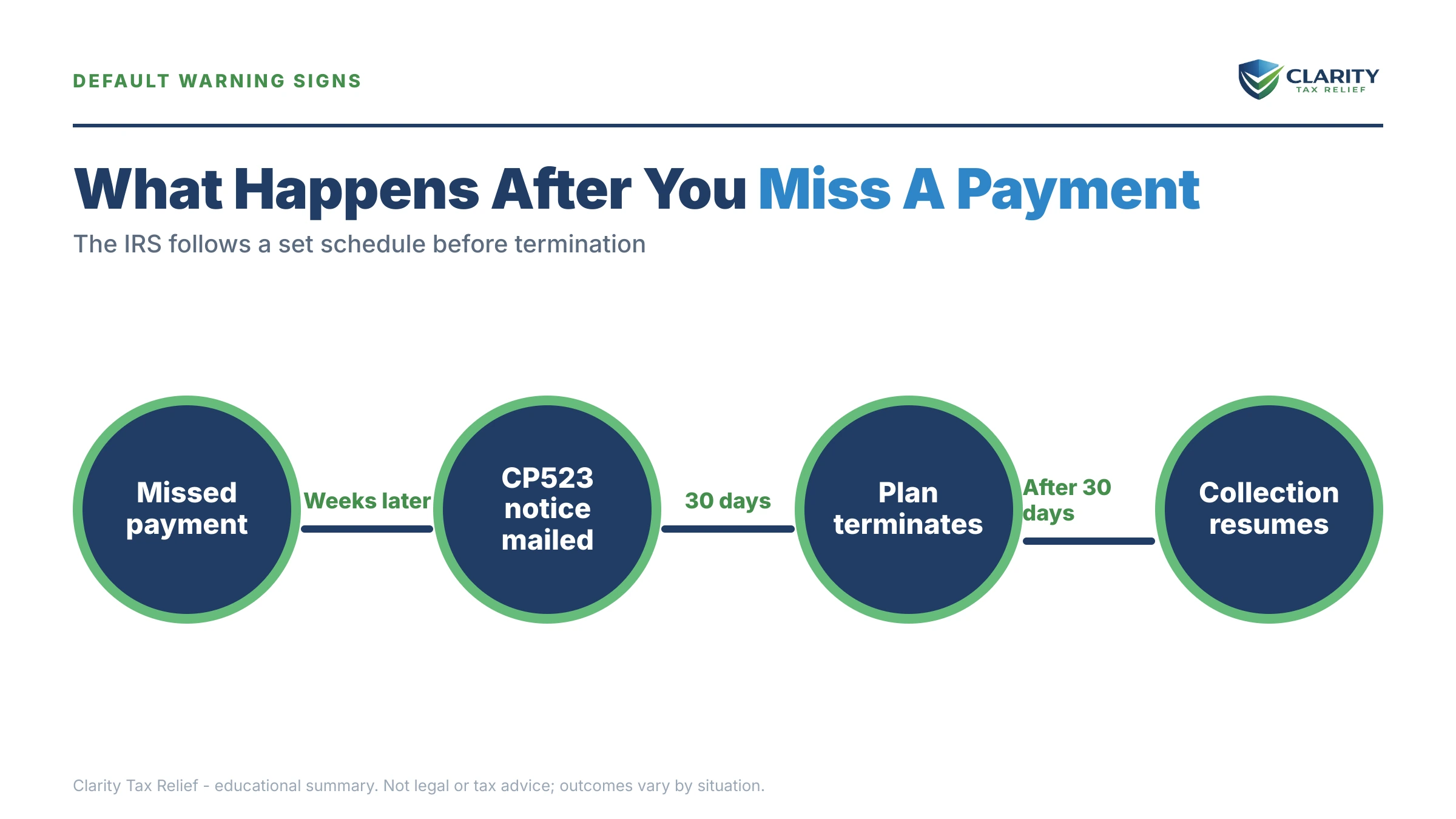
A terminated installment agreement puts your entire balance back into active IRS collections, due in full. The protections you enjoyed while the plan was current (no levies, the reduced late-payment penalty) fall away in stages, and each stage closes a door the previous one left open:
- CP523 issued: the IRS states its intent to terminate. The agreement is still technically alive until the termination date, and levies are generally on hold during this window. This is the cheapest, fastest moment to fix everything.
- Termination posts: the agreement is dead. You generally have about 30 days from the termination date to file a Collection Appeals Program request (Form 9423) asking Appeals to reinstate it. Enforcement typically stays paused while that appeal is pending, and levies are generally on hold for a period after termination too.
- Back in active collections, with the appeal window closed, the full balance is collectible now. The failure-to-pay penalty runs at its higher rate, and the balance-due notice cycle resumes where your account left off.
- Final notice of intent to levy, if the IRS hasn't already sent an LT11 notice or Letter 1058 on these years, one arrives and starts a 30-day clock with Collection Due Process rights. If a final notice already went out before your original agreement, the IRS doesn't need to send another.
- Levy: bank accounts (funds held 21 days before they're sent), wages (continuous until released), and up to 15% of Social Security through the Federal Payment Levy Program. If your total balance ever climbs past $66,000, passport certification enters the picture too.
One 2026 reality: the IRS workforce shrank roughly 27% in 2025, so reaching a human takes patience. CP523s, terminations, and levies come from automated systems that never stopped. The machine escalates on schedule whether or not anyone at the IRS ever reads your file.
Holding a CP523 with the clock running?
Get your defaulted payment plan reviewed free before the termination date on your notice passes. An experienced tax professional will map the fastest path back — reinstatement, restructure, or appeal — in one call.
How do you get back on an IRS payment plan?
There are five distinct ways back onto an IRS payment plan after a default. The right one depends on whether your agreement has terminated yet. Reinstatement revives the plan you had. A restructure rebuilds it with new terms or a new year folded in. A CAP appeal asks the IRS Independent Office of Appeals to overrule the termination. And a brand-new agreement starts over, using the same process covered in our hub on how to set up an IRS payment plan online.
| Path back | Fee | Typical timeline | Best when |
|---|---|---|---|
| Catch up before a CP523 issues | $0 | Same day, by phone or online | You missed one payment and can make it up now |
| Revise/reinstate via Online Payment Agreement | $6 | Minutes online | Individual balance of $50,000 or less, all returns filed |
| Reinstate or restructure by phone (CP523 number) | $89 ($43 low-income) | One call; written confirmation follows in weeks | You need to fold in a new year, lower the payment, or the online tool won't take your case |
| CAP appeal — Form 9423 | $0 to file | File within ~30 days of termination; Appeals typically decides in weeks | The plan already terminated, or the default itself is wrong |
| Brand-new installment agreement | $0–$178 setup depending on method | Minutes online; several weeks if financials are required | The appeal window has passed, or you want a full reset of the terms |
A few notes that change which row applies to you:
- Restructure, don't restart, when a new balance caused the default. The phone agent can combine the old plan and the new year into one agreement. You may be asked to sign a new Form 433-D confirming the terms. If the payment amount itself was the real problem, ask about a lower figure while you're on the line. Our guide to lowering an existing IRS payment plan walks through what the IRS will accept.
- The CAP appeal is broader than most people realize. A CAP appeal can challenge a proposed termination during the CP523 window and a completed termination afterward, and it's the right tool when the "default" is an IRS error, like a payment applied to the wrong year.
- Thresholds matter for a new agreement. Combined balances of $50,000 or less can generally be set up online over as long as 72 months using Form 9465 or the online tool. Above that, financial disclosure enters the picture (see IRS payment plan over $50,000).
- The online tool covers more than a fresh start. The Online Payment Agreement tool lets many individual taxpayers revise a plan for the $6 fee: change the monthly amount, move the due date, or convert to direct debit. If the agreement has fully terminated, your combined balance is over $50,000, or the debt is business or payroll tax, you'll usually need to call the number on your CP523 or work through a representative instead.
- Married and business filers, note: on a joint agreement, either spouse's new balance defaults the plan for both of you, even after a divorce decree splits the bill on paper. Business and payroll-tax agreements follow stricter reinstatement rules and usually can't be fixed online; those cases are worth professional eyes early. State payment plans (FTB, New York, and others) run on entirely separate rules and deadlines. Never assume the IRS windows apply to a state agreement.
How do you reinstate an IRS payment plan, step by step?
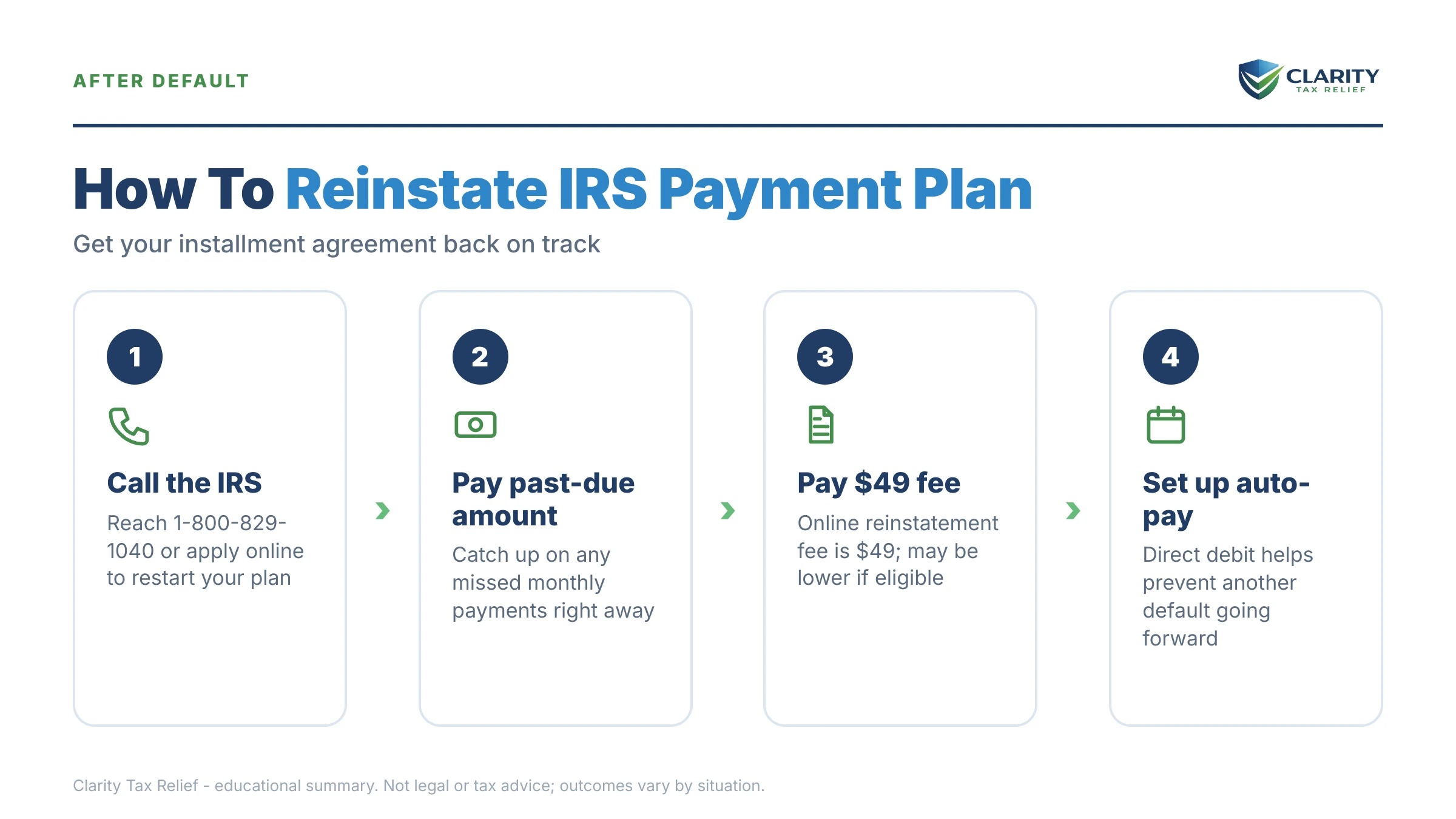
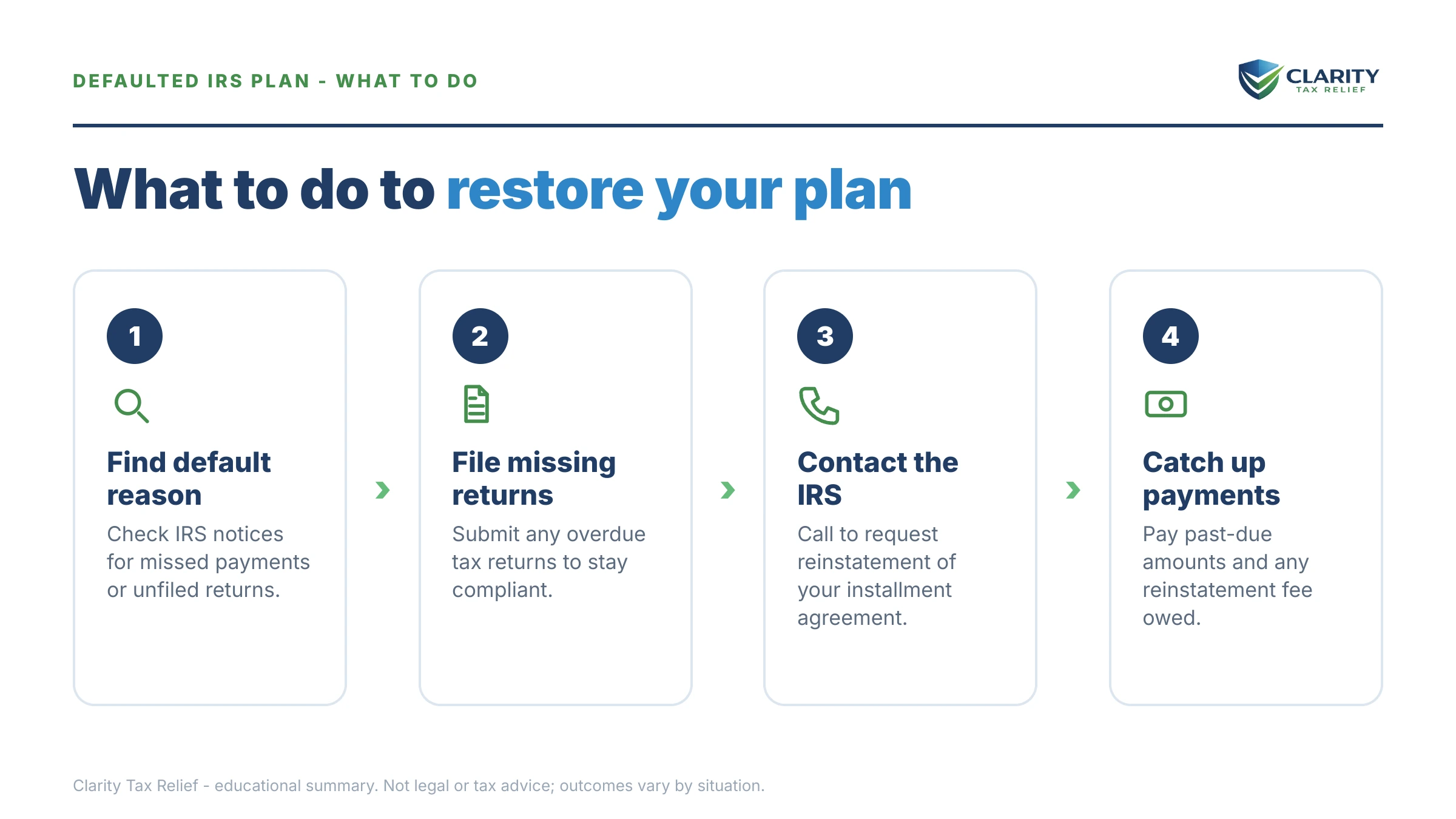
- Find the termination date on your CP523. Pull the notice and locate the termination date near the top. Every option below gets harder once that date passes.
- Cure whatever caused the default. File any missing returns, make up the missed payments if you can, and pull together the numbers on any new balance so everything can be folded into one plan.
- Request reinstatement before the termination date. Use the Online Payment Agreement tool ($6 fee) or call the number printed on the CP523 ($89, or $43 low-income) and ask to reinstate or restructure the agreement.
- Convert the plan to direct debit. A direct-debit installment agreement can't default over a forgotten due date, and low-income taxpayers get the fee waived or reimbursed.
- File Form 9423 if the plan already terminated. A Collection Appeals Program request filed within 30 days of the termination date asks Appeals to reinstate the agreement, and levies generally stay on hold while it's pending.
- Confirm the reinstatement posted. Watch for written confirmation or a new 'installment agreement established' entry on your account transcript before assuming you're protected.
About step 4: a direct debit installment agreement is the best insurance against a second default, because the two most common triggers, a forgotten due date and a check that never arrives, become impossible.
What does reinstatement look like with $7,400 owed and three years unfiled?
Here's a hypothetical scenario that mirrors how these defaults unfold. Say you drive and deliver on 1099 income, you set up a payment plan on a $7,400 balance from tax year 2022, and you've been paying $150 a month. But you never filed your 2023, 2024, or 2025 returns. The IRS's systems finally connected the dots and issued a CP523 for failure to file.
Reinstatement here runs in a fixed order, and skipping ahead wastes the call:
- File the three returns first. No agent can reinstate anything while required returns are missing, and in practice the IRS generally wants at least the last six years of returns filed before it will reinstate or approve a plan. (If reconstructing gig income from three years of 1099s feels impossible, our guide for people who haven't filed taxes in 3 years covers pulling your IRS wage records.) Say those returns show $1,500, $1,700, and $1,300 due, about $4,500 in new tax. Call it $4,300 remaining after some withholding credits but before fresh penalties.
- Do the combined math. Your old plan has roughly $6,200 left after a year of payments. Add the new $4,300 and the restructured balance is about $10,500. Spread over the maximum 72 months, the minimum payment is $10,500 ÷ 72 ≈ $146/month, but interest keeps compounding on the unpaid balance, so paying only the floor stretches the payoff to the plan's edge. Something like $175/month retires it meaningfully faster and cheaper.
- Know which doors are closed. At $10,500 you're just over the $10,000 ceiling for a guaranteed installment agreement. It wouldn't matter anyway, because that program also requires timely filing in the prior five years, which three unfiled years rules out. The streamlined route (balances of $25,000 or less, no financial disclosure) is the realistic lane here.
- Pay the fee and protect the plan. A restructure by phone costs $89 ($43 if your income qualifies as low-income). If the online tool can handle your case, it's $6. Then set up quarterly estimated payments for 2026, because a new April balance would default the restructured plan exactly the way the last one died.
What does a default cost in fees, penalties, and interest?
What default costs in penalties, interest, and fees
A defaulted installment agreement roughly doubles the penalty rate on everything you still owe. While an agreement is in effect (on a timely-filed return), the failure-to-pay penalty accrues at 0.25% per month. In default, it reverts to 0.5%, and it can climb to 1% per month once a final levy notice has been issued. On a $10,500 balance, that's the difference between about $26 and $52 or more in penalty every month, before interest.
Interest runs separately at the federal short-term rate plus 3 percentage points, adjusted quarterly and compounded daily. Reinstatement restores the lower penalty rate going forward, but it removes nothing that already accrued. You can estimate what your own default window added with our IRS Penalty & Interest Calculator.
The fees themselves are the small part: $6 online, $89 by phone or mail, $43 if you qualify as low-income (AGI at or below 250% of the federal poverty guidelines), with the low-income fee waived or reimbursed when you pay by direct debit. Setting up a brand-new agreement instead runs $0 to $178 depending on method, and the full breakdown is in our IRS payment plan setup fee guide.
Don't leave penalty relief on the table, either. If the years before your trouble started were clean, first-time penalty abatement can remove qualifying penalties if you have a clean three-year compliance history, and starting summer 2026, the IRS's Automatic Exemption from Penalty (AEP) applies similar relief automatically, with no request needed.
What does your transcript show after a payment plan default?
Your IRS account transcript records every installment agreement event as a coded entry, which makes it the fastest way to confirm a reinstatement posted. Most agreement activity appears as transaction code 971 with a short description next to it. Read the description to see what happened, since the code number is the same for all of them.
| Transcript entry | What it means | What to do |
|---|---|---|
| 971 — "Pending installment agreement" | Your reinstatement or plan request is logged; enforcement generally holds while it's pending | Keep making voluntary payments while you wait — it strengthens the request |
| 971 — "Installment agreement established" | The plan is active or reinstated | Verify the amount and due date, then watch that the first debit clears |
| 971 — "No longer in installment agreement" | The default or termination has posted to your account | Check your CP523 windows immediately — reinstate or appeal before they close |
| 972 — reversal entry | A prior 971 action was closed or reversed (for example, a pending request that ended) | Match it to the notice the IRS sent around the same date to see which action it undid |
| 276 — failure-to-pay penalty | The monthly late-payment penalty posted — at the higher default rate if the plan lapsed | Reinstate quickly to restore the 0.25% rate, then evaluate abatement |
| 196 — interest assessed | Interest charged on the growing balance | Interest generally can't be waived — reducing the balance is the only real fix |
When can you handle reinstatement yourself?
Handling it yourself versus hiring representation
Most single-cause defaults are a do-it-yourself fix. If you missed one payment, all your returns are filed, and your balance is $50,000 or less, the Online Payment Agreement tool or one call to the CP523 number will usually reinstate the plan the same day for $6 to $89. You don't need to pay anyone for that, and any firm that says otherwise is selling you your own phone call.
Experienced help earns its cost when the case has layers. Multiple unfiled years that have to be prepared before any agent will say yes. A terminated agreement where the CAP appeal has to be drafted and argued. Combined balances over $50,000 where the IRS wants a full financial disclosure and the numbers you submit set your payment for years. Business or payroll tax debt, where reinstatement rules are stricter and personal liability can be in play. A second default, where the IRS is noticeably less forgiving. Or a levy already in motion, where sequencing the release and the reinstatement matters. In those cases, the order you fix things (returns, penalties, then the agreement) changes what you ultimately pay.
If your termination date is already close, or already behind you, it costs nothing to have an experienced tax professional map the fastest route back before the appeal window closes: call (888) 825-7779 or use the 2-minute form.
What do the terms on your CP523 mean?
- Default: you broke a condition of the agreement (a payment, a filing, or a new balance), though the plan may still be alive.
- Termination date: the date printed on the CP523 when the agreement ends; everything is easier before it, harder after.
- Cure: fixing the specific thing that caused the default, which is always the IRS's precondition for saying yes.
- Reinstate vs. restructure: reinstating revives the plan you had; restructuring rebuilds it with new terms or a new tax year folded in.
- CAP (Collection Appeals Program): the fast appeal, filed on Form 9423, that can challenge a proposed or completed termination.
- CSED: the collection statute expiration date, the end of the IRS's 10-year window to collect, which pauses (but never restarts) during pending requests and appeals.
Common questions
Can I reinstate an IRS payment plan after it has already been terminated?
Yes, but the path changes. Within roughly 30 days of the termination date you can file Form 9423 under the Collection Appeals Program and ask Appeals to reinstate the agreement. The IRS generally holds enforcement while that request is pending. After the appeal window closes, the old agreement is gone. You would apply for a new installment agreement instead, which most people with balances of $50,000 or less can do online.
How much does it cost to reinstate a defaulted IRS installment agreement?
The IRS charges $6 to revise or reinstate a payment plan through the Online Payment Agreement tool, or $89 when you do it by phone, mail, or in person. Taxpayers at or below 250% of the federal poverty guidelines pay a reduced $43 fee, which can be waived or reimbursed with direct debit. Reinstatement does not erase the penalties and interest that accrued while the plan was in default.
Does defaulting on a payment plan reset the IRS 10-year collection clock?
No. The collection statute expiration date (CSED) never resets, but it can pause. The 10-year clock is suspended while an installment agreement request is pending, for 30 days after a rejection or termination, and while any appeal runs. So a default doesn't give the IRS a fresh 10 years. The pauses it creates can still leave the IRS more time to collect than you expected.
Bottom line: your next 24 hours
- Find the termination date on your CP523. That one date decides if you're reinstating, appealing, or reapplying. Write it somewhere you'll see it.
- Gather the cure materials: your last filed return, a list of any unfiled years, the missed payment amounts, and a realistic monthly figure you can sustain.
- Get a free case review before that date passes. Call (888) 825-7779 or use the 2-minute form. An experienced tax professional will confirm which path back is fastest for your exact default.
Primary sources for this guide: the IRS's own pages on understanding your CP523 notice and payment plans and installment agreements. If the IRS terminates your agreement in error and normal channels stall, the Taxpayer Advocate Service can intervene in genuine-hardship cases.
This guide is general information, not tax or legal advice for your specific situation. Eligibility for IRS programs depends on individual facts and circumstances; no outcome is guaranteed.